
Call Loop is now called Broadcast. Same company, same team, same login. The website moved from callloop.com to broadcast.so, and that’s the whole change.
What it does: you send one text, voicemail drop or automated call to your whole list at once. Plans start at $15 a month, there’s a 14-day trial, and you can have a first test broadcast out in about ten minutes. It only sends to US and Canadian numbers.
This tutorial walks through the setup step by step, then gives you six ways a one-person business can use it.
Start the 14-day Broadcast trial here.
Some links in this post are affiliate links. If you buy through them, I may earn a commission at no extra cost to you.
Key Takeaways
- Call Loop and Broadcast are the same product. The company renamed itself after 15+ years. Your old Call Loop login, contacts, credits and plan all carry over. Nothing to migrate.
- One set of credits covers every channel. A text is 1 credit. A picture message or a delivered voicemail drop is 2. A voice call is 1 credit a minute. Unused plan credits roll over to the next month.
- Pricing starts at $15 a month for 250 credits. Every plan has unlimited contacts and unlimited users. You pay for messages, not seats or list size.
- You need a registered number before you text for real. US carriers require it from every texting tool. Broadcast says approval usually takes about 5 business days, so start that on day one. The trial gives you a test number in the meantime.
- It’s US and Canada only. If your audience is in the UK, Europe or Australia, this isn’t the tool for you.
Is Call Loop the Same as Broadcast?
Yes. If you searched for Call Loop (or CallLoop, as a lot of people type it) and landed on broadcast.so, you’re in the right place.
Call Loop started out doing automated calls. Over 15 years it added texting, picture messages, ringless voicemail and automated campaigns. The old name only described the first one. Broadcast describes all of it in one word.
One thing that might throw you. When you click Log in, the address bar still says app.callloop.com. That’s normal. Same app, new front door.
Why I’m Writing About It
I’ve known Chris Brisson, the co-founder, for years. This product is something he really cares about, and it shows.

Two things stand out to me. The interface is clean, and it’s easy to set up. A lot of SMS tools feel like they were built for a call centre. This one feels like it was built for a marketer who has twenty minutes.
You don’t have to take my word for the product itself. Broadcast reports a 4.5 out of 5 rating from 83 reviews on Capterra. Those reviews were written under the Call Loop name, and they describe the same product.
Broadcast Pricing and What a Credit Buys
I checked these on Broadcast’s pricing page in November 2026. All prices are in US dollars.
| Plan | Monthly price | What that covers |
|---|---|---|
| 250 credits | $15 ($13 on annual) | 250 texts or 125 voicemail drops |
| 1,000 credits | $49 | 1,000 texts or 500 voicemail drops. The trial rolls into this plan. |
| 10,000 credits | $329 ($277 on annual) | 10,000 texts or 5,000 voicemail drops, plus a dedicated account manager |
| Custom | Priced with their team | More than 10,000 messages a month |
There are tiers in between too (500, 2,500, 5,000 and 7,500 credits). Slide the selector on the pricing page to see them.
| Message type | Cost in credits |
|---|---|
| Text (per 160 characters) | 1 |
| Picture message (image or audio, up to 1,600 characters) | 2 |
| Ringless voicemail drop | 2, and only if it’s delivered |
| Voice call | 1 per minute (2 with press-1 transfer) |
| A text reply you receive | Half a credit |
So here’s the math for a small list. You have 300 people. You send one 140-character text. That’s 300 credits. On the $49 plan, you could do that three times a month and still have credits left to roll over.
Keep in mind, carrier fees set by the mobile networks get passed through to you. That’s true of every texting tool, but it’s worth knowing before your first bill.
How to Set Up Broadcast, Step by Step
I’ve followed Broadcast’s own setup guide here and added the parts people trip on.
Step 1: Start the Trial (and Know How It Ends)
Sign up on the Broadcast site and click Try it free. You get 14 days with every feature, 25 credits, a test number and a demo keyword.
Two things to know up front. A credit card is required. And after day 14, the trial moves you to the $49 a month plan with 1,000 credits unless you cancel in the app first.
If 250 credits is plenty for you, switch to the $15 plan before day 14. You can change plans from your account during the trial.
Step 2: Start Your Number Registration Right Away
Do this first, because it’s the only step with a wait.
US mobile carriers won’t deliver business texts from an unregistered number. So before you can text your real list, you need a verified number. Go to Numbers in the dashboard and choose one of two types:
- Toll-free number. The simpler route for most solo businesses. Broadcast includes toll-free SMS compliance for the US and Canada on every plan.
- 10DLC number. A local 10-digit number. Good if you want a local area code.
Then fill in the compliance form. The carriers want to see your business details, your website and how people opt in to your texts. Broadcast says approval usually takes about 5 business days.
While you wait, the trial’s test number lets you send real test broadcasts. Every message from it carries a “test mode” label, so it’s for practice, not for customers.
Step 3: Import Your Contacts
- Make a CSV file. Phone number is the only required column. Name and email are optional.
- Go to Contacts / Lists and click Import Contacts.
- Upload the file and check that each column is matched to the right field.
- Save the list.
Your first list goes to Broadcast’s team for a quick review. After that one’s approved, later lists are available right away. That’s them protecting deliverability for everyone on the platform, which is what you want from a texting provider.
Only import people who agreed to get texts from you. More on that below.
Step 4: Send Your First SMS Broadcast
- Click Broadcasts (the paper airplane icon), then New broadcast.
- Choose the SMS tab.
- Write your message. Use a merge field like
{{firstname}}to greet people by name. Keep it under 160 characters and it costs 1 credit per person. - Under Send from, pick your number (the test number during the trial).
- Under Send to, pick your list.
- Send it now, or choose a date and time.
- Click Create broadcast.
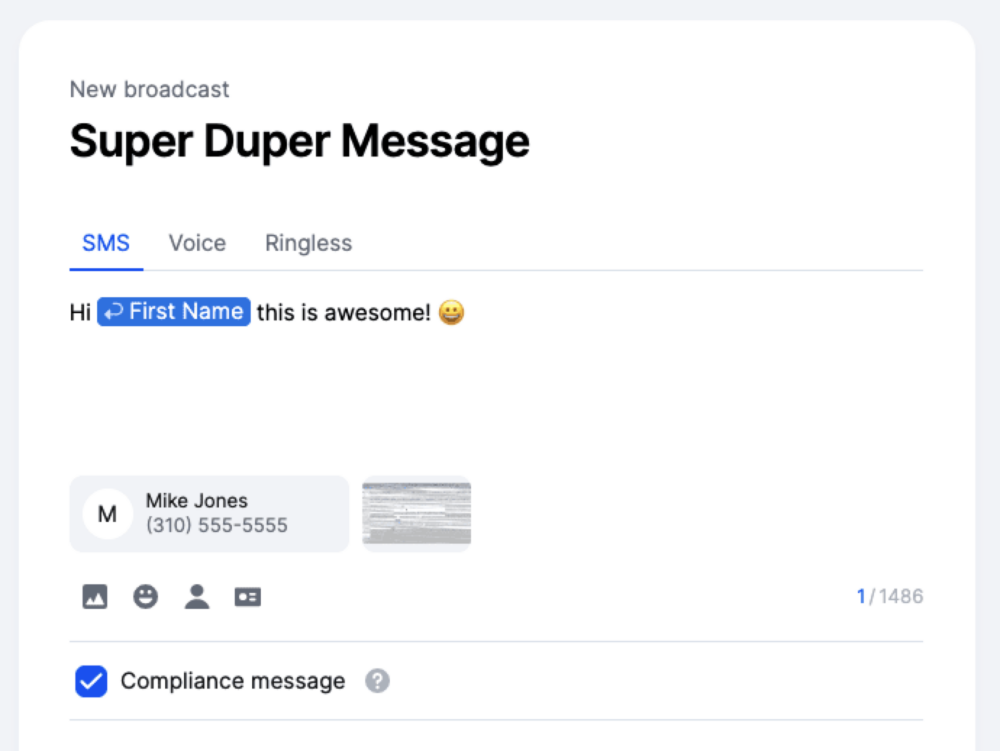
That’s a broadcast SMS. One message, one list, done.
Send the first one to a list with just your own phone on it. You’ll see exactly what your customers will see, and it costs you one credit.
Step 5: Read the Report
Open the broadcast after it sends. You’ll see five numbers:
- Total: everyone the broadcast was sent to
- Success: messages delivered
- Failed: messages that didn’t get through
- Unsubscribed: people who replied STOP
- Pending: still waiting to send
Watch Failed and Unsubscribed. A high failed count usually means landlines or bad numbers in your list. A high unsubscribe count means the message wasn’t what people signed up for.
Step 6: Grow Your List With a Keyword or a Web Form
Importing a list gets you started. These two tools keep it growing.
Text-to-join keywords. Pick a short word like VIP or WEBINAR. People text it to your number, get an instant reply and land on your list. The reply can also ask for their name and email. Use a different keyword in each place you promote, and each one fills its own group, so you know where people came from.
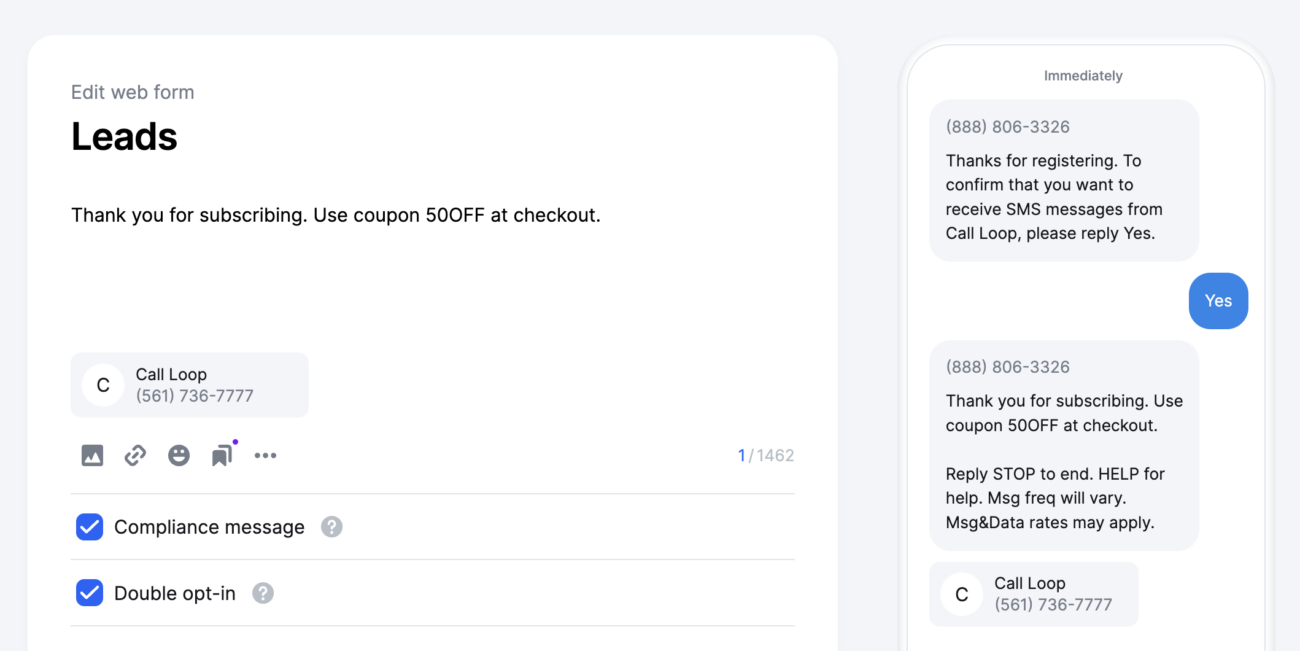
Web forms. Go to Web Forms and create a new form. Give it a title, write the first text people get when they sign up, choose your fields, then copy the HTML code onto your site. Turn on the compliance message and double opt-in. Both are recommended by Broadcast, and both protect you.
Step 7: Put Follow-Up on Autopilot With a Campaign
This is where people get confused, so here’s the difference.
| Broadcast | Campaign | |
|---|---|---|
| What it is | One message, sent once | A series of messages over time |
| Who gets it | The list you pick | Anyone who joins, automatically |
| When it sends | Now, or a time you choose | On a schedule you set once |
| Use it for | A sale, an announcement, a reminder | Welcome series, event countdowns, appointment reminders |
Campaigns come in a few types. Interval campaigns send a set time after someone joins (1 day later, 3 days later). Date campaigns send on fixed calendar dates, which suits an event. Date field campaigns use a date saved on each contact, like an appointment, and send before, on or after it.
A campaign can mix texts, voicemail drops and calls in one flow. People can be enrolled when they join a list, fill in a form, text a keyword, or when another tool fires a webhook.
Step 8: Try a Voicemail Drop and Turn On Fallback
For ringless voicemail or voice calls, you add a caller ID instead of a texting number. Create a broadcast, choose the Ringless or Voice tab, click Send from, then Add Caller ID. Broadcast calls that number with a code, and you type it in.
For the audio, you can record yourself, upload a file, use text-to-speech, or use a clone of your own voice. You’re only charged for voicemail drops that are delivered.
The cool thing is the fallback option. Scroll down to Fallback Message when you create a broadcast and switch it on. If a text fails, Broadcast can send that person a voicemail drop or a call instead. You need auto-recharge turned on under Settings > Billing & Usage for it to work.
Read This Before You Text Anyone
Texting isn’t like email. The rules are stricter and the carriers enforce them.
- Only text people who asked for it. No purchased lists. No scraped numbers. Broadcast closes accounts that send spam.
- Voicemail drops need consent too. Broadcast’s own pricing page points out that the FCC has required prior express consent for ringless voicemail since 2022.
- Tell people how to stop. Reply STOP has to work. Broadcast handles the opt-out for you.
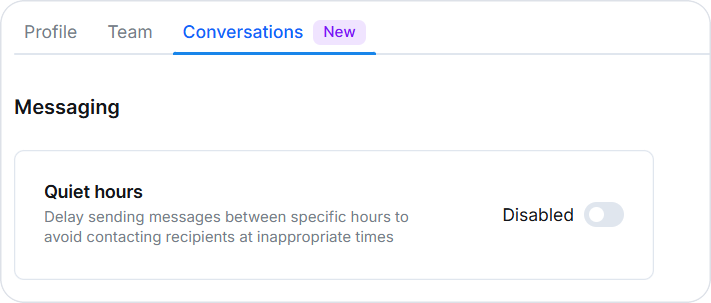
- Quiet hours are built in. Messages wait for 8 am to 9 pm in each contact’s own time zone.
This isn’t legal advice. If you’re in a regulated field, check the rules for your industry.
6 Ways Solopreneurs Can Use Broadcast
You don’t need a big list for this to pay off. You need a moment where a text gets read and an email doesn’t.
1. Webinar and Workshop Reminders
Most people who register for a webinar don’t show up. A text an hour before, and another when you go live, fixes a lot of that.
Set it up as a date campaign. One text the day before. One an hour before. One at start time with the link. One customer quoted on Broadcast’s pricing page, the CEO of REIFuze, says text reminders raised his webinar show rate by 24%.
If you run webinars, I’ve written about Kartra and WebinarJam for solopreneurs. Broadcast also connects to GoToWebinar and EverWebinar.
2. Launch Day and Flash Sales
Cart closes at midnight. Your email went out at 9 am and half your list hasn’t opened it.
One SMS broadcast at 6 pm does the job: “Doors close tonight at midnight. Here’s the link.” Use a branded short link so you can see who clicked.
3. Text-to-Join From a Podcast, Video or Stage
Nobody types a long URL they heard in a podcast. They will text one word.
“Text GUIDE to this number and I’ll send you the checklist.” The instant reply delivers the link, asks for their email, and adds them to your list. Use a different keyword for your podcast, your YouTube channel and your talks, and you’ll know which one brings people in.
4. Appointment and Call Reminders
If you’re a coach or consultant, a no-show is an hour you can’t sell again.
Save each client’s appointment in a date and time field. A date field campaign then texts them the day before and an hour before, automatically, for every booking.
5. Fast Follow-Up on New Leads
Someone fills in your form at 10 pm. You’re asleep. The lead is cold by morning.
A web form with a welcome campaign replies in seconds. First text right away, a second one the next day, and a voicemail in your own voice on day three. You set it up once.
6. Waking Up Old Customers
Past customers who opted in are the easiest sale you have. A short voicemail drop feels personal in a way a mass email doesn’t. “Hey, it’s Andrew. I’ve got something new I think you’d like. Check your texts for the link.”
Then the text follows with the link. That’s two credits for the voicemail and one for the text.
Does It Work With Your Email Tool?
Probably. Broadcast lists 33 integrations, including Zapier, HubSpot, ActiveCampaign, Keap, Mailchimp, AWeber, Kit (ConvertKit), ClickFunnels and ClickBank.
Text doesn’t replace email. Email is where you teach and tell stories. Text is for the moment that matters: the reminder, the deadline, the link. If you still need a simple email tool, here’s my take on SendFox.
Who Should Skip Broadcast
- Your audience is outside the US and Canada. It doesn’t send to the UK, Europe or Australia.
- You want to text cold prospects. That’s against the rules everywhere, and your account will be closed.
- You want a free plan. There’s a trial, but it needs a card and rolls into a paid plan.
- You pay with PayPal. It’s Visa, Mastercard, Discover and American Express only.
Broadcast (Call Loop) FAQ
Yes. Call Loop renamed itself Broadcast after 15+ years. It is the same company, team and product, and the website moved from callloop.com to broadcast.so. Existing customers sign in with the same login and keep their contacts, plan and credits.
Plans start at $15 a month for 250 credits and go up to $329 a month for 10,000 credits, with custom pricing above that. Every plan includes unlimited contacts and unlimited users. Annual billing costs less per month.
Yes. The trial lasts 14 days and includes every feature, 25 credits, a test number and a demo keyword. A credit card is required. After 14 days it moves to the $49 a month plan unless you cancel or change plans in the app first.
One credit sends one text of up to 160 characters to one person. A picture message costs 2 credits, a delivered ringless voicemail costs 2 credits, and a voice call costs 1 credit per minute. Unused plan credits roll over to the next month.
A broadcast is one message sent once to a list you choose. A campaign is an automated series of messages that sends over time to anyone who joins. Use a broadcast for a sale or announcement and a campaign for welcome series and reminders.
Yes. US carriers require a verified toll-free or 10DLC number for business texting. You register inside your Broadcast account, and Broadcast says approval usually takes about 5 business days. During the trial you can practise with a test number.
No. Broadcast sends texts, voicemail drops and voice calls to phone numbers in the United States and Canada only. It is not available for the UK or Australia.
What to Do Next
Start the trial and submit your number registration the same day. That’s the only part with a wait.
While it’s being approved, use the test number. Send a broadcast to your own phone, set up one keyword, and build the one campaign from the list above that fits your business. By the time your number is approved, you’ll be ready to send for real.
Try Broadcast free for 14 days.

Hey, I’m Andrew. I moved to Portugal from Nova Scotia, Canada.
I’ve been building and monetizing content sites since 2003. I have built and ranked dozens of sites over many years, and I built my own WordPress SEO plugin, called SEOMedic. Now I build niche directory sites and teach others to do the same.
I’m certified in Claude and Claude Code, and a certified Systeme.io funnel builder. I run Reddit and YouTube ads for clients.
Book a free Zoom call if you want a fresh set of eyes on your business.


