
Last updated:
FuseBase’s Solo plan costs $39 a month. That’s $468 a year.
On AppSumo right now, you can get lifetime access for $79. Once.
FuseBase also has 602 reviews on AppSumo with a 4.6 rating, and it’s been running AppSumo deals since 2020. So this isn’t a brand-new tool hoping to find customers.
But the price isn’t the real question for a solopreneur. The real question is whether you need an all-in-one workspace with client portals, AI agents, and an app builder, and which tier actually covers what you’d use. That’s what this review is about.
Some links in this post are affiliate links. If you buy through them, I may earn a commission at no extra cost to you.
The short version
FuseBase is an AI-powered workspace that combines three things most solopreneurs pay for separately: an internal knowledge base like Notion, branded client portals, and AI agents and automations.
On top of that, it now lets you build your own apps with AI coding tools like Claude Code and Cursor, and it can host open-source tools like n8n for you.
For a solopreneur with clients, the client portal is the main reason to buy. If you’re sending files, updates, and onboarding steps across email, Google Drive, and Slack, FuseBase puts all of that behind one branded login.
The catch is that it does a lot, and it’s in the middle of a big rebuild. Expect a learning curve and some rough edges. And the most interesting features, like hosted n8n and white labeling, need you to stack a lot of codes.

What is FuseBase?
FuseBase used to be called Nimbus Note. If you bought Nimbus Note on AppSumo years ago, this is the same company.
It started as a note-taking and knowledge base app and has since grown into what it calls an “AI-native work platform for client-facing businesses.” The company was founded in 2014, is based in Ohio, and has a team of 11 to 50 people. The CEO and founder is Pavel Sher.
In plain English, FuseBase tries to be the one place where you run client work. Your internal notes and SOPs live on one side. Your client-facing portals live on the other. AI agents and automations work across both.
AppSumo lists it as an alternative to Basecamp, Notion, and Replit. That gives you a sense of how wide it’s trying to go.
Why solopreneurs should care
Here’s the problem FuseBase is built to solve.
Most solopreneurs run client work across five or six tools. Proposals in Google Docs. Files in Dropbox. Updates over email. Tasks in Trello or Asana. Notes in Notion. Invoices somewhere else.
Every one of those is a place your client has to log into, or a link they lose, or a “can you resend that?” email.
A client portal fixes that. Your client gets one branded link. Inside, they see their files, project timeline, tasks, and messages. You stop being the human search engine for every document you’ve ever sent them.
Which means you look more professional, answer fewer admin questions, and spend more time on the work you’re actually paid for.
That’s the core value for a one-person business. Everything else in FuseBase is extra.
FuseBase features
Client portals
This is the headline feature.
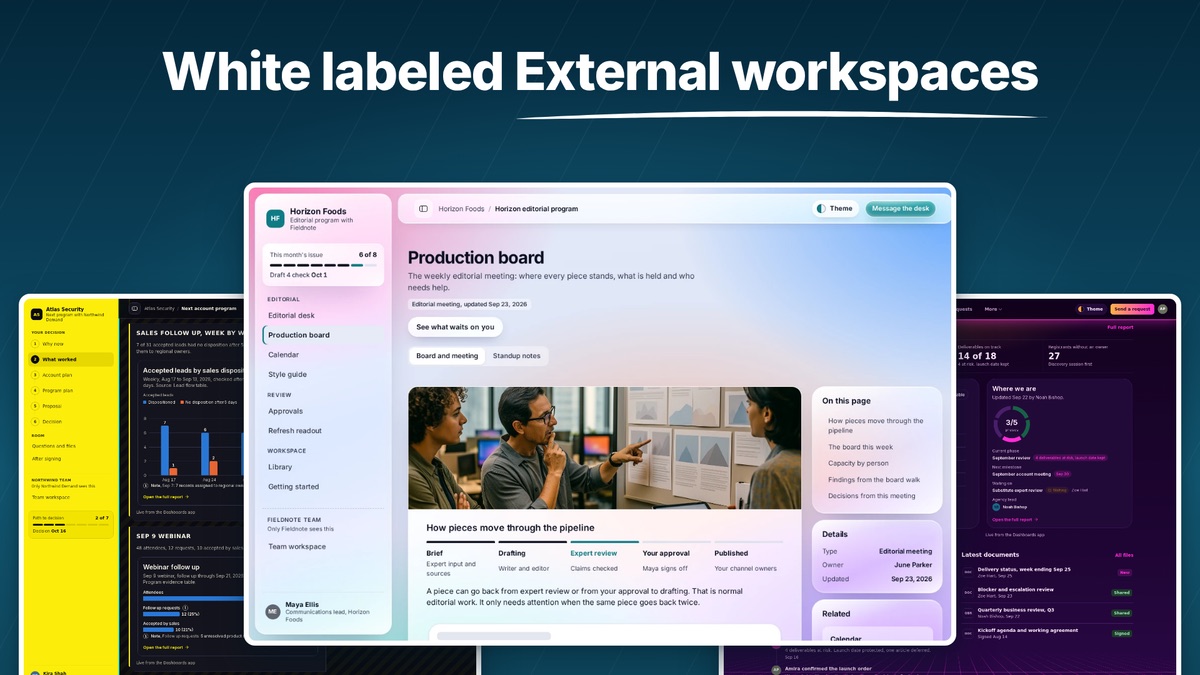
You can create branded portals for clients, partners, or prospects. Use them for client onboarding, project delivery, sales deal rooms, or even SEO-friendly public sites.
Inside a portal, you can add pages, files, task lists, timelines, chat, and widgets like galleries and countdowns. Granular permissions let you control exactly which files and folders each client can see. So you can run several clients from one setup without one seeing the other’s work.
FuseBase also says you can now build an entire portal with AI, and embedded pages and apps automatically match each portal’s colors.
Internal workspaces
The other half of FuseBase is a Notion-style workspace for your own notes, SOPs, and project records.
You get drag-and-drop pages with tables, PDFs, images, and embeds from Figma, Miro, and Looker Studio. There are task lists, Kanban boards, a calendar view, and dashboards.
FuseBase recently moved its documents to Markdown, which gives AI a clearer structure to create and update content. If you’re already using AI to draft SOPs and client docs, that’s a sensible change.
AI agents and automation
FuseBase includes AI agents you can add to both your internal workspaces and client portals. They draft documents, summarize meetings, answer questions across your content, and update records.
According to FuseBase’s FAQ, it mostly uses GPT-5, with GPT-4.1 and Claude 3.7 for some tasks. You can also plug in your own OpenAI API key, and your key is then used for everything.
There’s also AI transcription for video and audio, OCR for scanned documents, and an AI documentation tool that watches you use a web app and writes a step-by-step guide with screenshots. That last one is genuinely useful if you create tutorials or onboarding guides for clients.
Build your own apps with AI
This is the biggest change over the last year.
FuseBase now lets you build custom apps using AI coding tools you already pay for, like Claude Code, Cursor, ChatGPT, or VS Code. FuseBase provides the backend: a database, Stripe integration, and hosting. You can use those apps on their own, inside your workspace, inside client portals, or publicly.
The pitch is that you bring your existing AI subscription instead of paying FuseBase for AI tokens. So the cost of building stays under your control.
For a solopreneur, this means you could build a simple intake form, client dashboard, or proposal tool without paying for another SaaS subscription. I’ve written before about building tools with Softr and Airtable. FuseBase is trying to put that kind of build-it-yourself approach inside the same place your clients already log in.
Keep in mind, this part is newer. Reviewers who’ve pushed it hardest report that some connections don’t work as smoothly as advertised yet.
APIs and MCP
FuseBase has built-in APIs and MCP support. MCP, or Model Context Protocol, is the standard that lets AI tools like Claude connect directly to other software.
So you could ask Claude to create a page in FuseBase, update a client portal, or pull information out of your workspace. That’s powerful if you work with AI every day.
The important detail: on AppSumo, FuseBase MCP isn’t included with 1 or 2 codes. It starts at 3 codes.
Hosted n8n, Firecrawl, and Paperclip
FuseBase can now host three popular open-source tools for you, so you don’t have to deal with servers, updates, or maintenance:
- Paperclip: powers FuseBase Work, its AI agent and project management system
- n8n: the automation tool a lot of people use as a cheaper Zapier
- Firecrawl: scrapes and structures web data

Here’s the catch, and it’s a big one for solopreneurs. According to FuseBase’s own deal image, hosted Paperclip needs 10 codes, hosted n8n needs 15 codes, and hosted Firecrawl needs 20 codes.
At $79 a code, that’s $790, $1,185, and $1,580. So don’t buy 1 code thinking you’re getting hosted n8n. You aren’t.
FuseBase AppSumo pricing
Each code costs $79, and you can stack as many as you want. More codes unlock higher limits and a higher plan.
According to the deal terms, 1 to 2 codes map to the Solo plan, 3 to 9 codes map to Essentials, and 10 or more codes map to Advanced.
Here’s what the first four tiers include:
| 1 code ($79) | 2 codes ($158) | 3 codes ($237) | 4 codes ($316) | |
|---|---|---|---|---|
| Users | 1 | 3 | 10 | 12 |
| Workspaces | 50 | 100 | 200 | 250 |
| Client portals | 1 | 5 | 15 | 20 |
| Client accounts | 5 | 25 | 75 | 100 |
| Frontend apps | 5 | 10 | 15 | 20 |
| Full-stack apps (active) | 1 | 2 | 3 | 4 |
| Storage | 50 GB | 100 GB | 400 GB | 450 GB |
| OCR records | 1,500 | 3,000 | 6,000 | 7,000 |
| AI agents | 5 | 8 | 20 | 25 |
| AI transcription hours/mo | 5 | 10 | 25 | 30 |
| AI automation credits/mo | 1,000 | 5,000 | 15,000 | 20,000 |
| AI requests/mo | 1,000 | 2,500 | 10,000 | 15,000 |
| FuseBase MCP | No | No | Yes | Yes |
On the first four tiers, FuseBase extensions are included at every level, and FuseBase MCP starts at 3 codes. White labeling, SOC 2, HIPAA, managed apps, SEO-friendly apps, and FuseBase Work aren’t included in tiers 1 to 4.
Every code beyond 10 adds 3 members, 3 guests, 100 GB of storage, 1,500 OCR records, and 2 more client portals.
You get lifetime access, all future updates for your plan, and a 60-day refund window. You need to redeem codes within 60 days of purchase.
Compare that with paying monthly
FuseBase’s regular pricing is $39 a month for Solo, $99 a month for Essentials, and $399 a month for Advanced or less if you pay annually.
So 1 code at $79 pays for itself in about two months compared with the monthly Solo plan. Three codes at $237 cover what Essentials costs in under three months.
That said, the AppSumo tiers don’t map one-to-one to the regular plans. Usage limits like AI requests and automation credits are different, so compare the specific numbers you care about.
How many codes should a solopreneur buy?
I’ve written before about how lifetime deals push you toward buying more tiers than you need. I call it the Multi-Tier Burnout Framework. So here’s my honest take.
1 code ($79) works if you want one client portal and a workspace for yourself. You get 5 client accounts, 5 AI agents, and 1,000 AI requests a month. Fine for testing, or if you only work with one client or one group at a time.
2 codes ($158) is the sweet spot for most solopreneurs with clients. You get 5 client portals, 25 client accounts, and 3 users, so you can add a VA or contractor. You also get 5,000 automation credits a month instead of 1,000.
3 codes ($237) makes sense if you want MCP so Claude or other AI tools can work directly with FuseBase. You also get 15 portals and 75 client accounts.
10 codes ($790) is for agencies, or anyone who specifically wants white labeling, hosted Paperclip, and the Advanced plan. For most solopreneurs, that’s more than you need.
Start with the tier that fits what you’d use this month, not what you might use one day. You can stack more codes later while the deal is live.
What reviewers say
FuseBase has 602 reviews on AppSumo with a 4.6 out of 5 average. That breaks down as 520 five-taco reviews, 27 four-taco, 22 three-taco, 14 two-taco, and 19 one-taco.
The positive reviews praise how much it does. One reviewer calls it the most feature-rich app they’ve ever used, with documentation, a client portal, a database, AI automation, and app building in one place. Others say they bought it to replace Notion or Evernote and have since rebuilt client tools inside it.
The more critical reviews tell a consistent story. Several reviewers bought during a major product transition and found the experience less smooth than expected. Documentation sometimes lags behind new features. And one reviewer who was otherwise very positive said MCP connections, from Claude into FuseBase and from agents inside it, didn’t work as expected.
There’s also a support point worth knowing. The founder has posted that FuseBase can’t guarantee live demo calls, even if you book one, because calls often run long. Email support is the main route, and reviewers generally describe it as responsive.
The downsides
It does a lot, so there’s a learning curve. Workspaces, portals, apps, agents, automations, and hosting is a lot to learn. If you just want a simple client portal, you’ll spend time ignoring features.
It’s mid-rebuild. FuseBase has rebuilt several core parts of the product over the last year. That means rapid progress, but also bugs and outdated documentation in places.
The best features need a lot of codes. White labeling, hosted n8n, Firecrawl, and FuseBase Work are all out of reach for 1 to 4 codes.
MCP needs 3 codes. If connecting Claude or other AI tools is a big part of why you want FuseBase, budget for $237, not $79.
Reselling isn’t here yet. FuseBase has said it wants to let users resell the apps and functionality they build. The founder has said that’s been postponed, with 2027 as the goal.
Who should buy FuseBase?
FuseBase is a good fit if you:
- Work with clients and want one branded place for files, updates, and onboarding
- Currently juggle Google Drive, email, Notion, and a task app for client work
- Want AI agents and automation inside the same tool your clients use
- Like the idea of building your own small tools with Claude Code or Cursor
- Are happy to learn a feature-rich tool and live with some rough edges
Skip it if you:
- Don’t have clients and just want notes, where Notion or Google Docs is simpler
- Want a polished, stable tool with every feature fully finished
- Mainly want hosted n8n, which needs 15 codes
- Need white labeling but only want to spend $79
My take
The value of FuseBase for a solopreneur is simple. It replaces the patchwork of shared folders, email threads, and status update calls with one branded place your clients log into. That makes you look bigger than you are and saves you real admin time every week.
Everything on top of that, the AI agents, app building, MCP, and hosted tools, is where FuseBase is heading. Some of it is excellent. Some of it is still catching up with the vision. The reviews say so clearly, and so does the founder.
So here’s how I’d approach it. Buy the tier that covers the client portals you need today, probably 2 codes. Set up one portal for your best client and move their files, timeline, and updates into it. Use the 60-day refund window as your test. If your client prefers it to your old setup within a few weeks, you’ve got your answer.
FuseBase FAQ
What is FuseBase?
FuseBase is an AI-powered workspace for client-facing businesses. It combines an internal knowledge base, branded client portals, AI agents, automations, and an app builder in one platform.
Is FuseBase the same as Nimbus Note?
Yes. FuseBase was formerly called Nimbus Note. Previous Nimbus Note AppSumo customers are grandfathered into their existing limits and can buy more codes to increase them.
How much does FuseBase cost?
FuseBase’s regular plans start at $39 a month for Solo, $99 a month for Essentials, and $399 a month for Advanced. On AppSumo, it’s $79 per code for lifetime access, and you can stack unlimited codes.
Does the FuseBase AppSumo deal include n8n?
Only if you stack enough codes. According to FuseBase’s deal image, hosted n8n needs 15 codes, hosted Firecrawl needs 20 codes, and hosted Paperclip needs 10 codes.
Does FuseBase have white labeling?
Yes, but on AppSumo it isn’t included in tiers 1 to 4. It’s part of the higher tiers.
What AI does FuseBase use?
FuseBase mostly uses GPT-5, with GPT-4.1 and Claude 3.7 for some tasks. You can connect your own OpenAI API key, and FuseBase will use it for everything.
Can I try FuseBase before buying?
Yes. FuseBase offers a free trial, and the AppSumo deal has a 60-day refund window, so you can test it with real client work first.
Is FuseBase a good Notion alternative?
For internal docs, Notion is more polished. Where FuseBase wins is client-facing work. Notion doesn’t have proper client portals with granular permissions, and FuseBase does.

Hey, I’m Andrew. I moved to Portugal from Nova Scotia, Canada. Follow my journey here.
I’ve been building and monetizing content sites since 2003. I have built and ranked dozens of sites over many years, and I built my own WordPress SEO plugin, called SEOMedic. Now I build niche directory sites and teach others to do the same.
I’m certified in Claude and Claude Code, and a certified Systeme.io funnel builder. I run Reddit and YouTube ads for clients.
Read more of my articles on Medium.
Book a free Zoom call if you want a fresh set of eyes on your business.
