
Last updated:
Rhino Voice is on AppSumo for $5. Once. That’s the whole price for a lifetime license.
Wispr Flow, the market leader in AI dictation, costs $144 a year. Typeless and VoiceDash both want a monthly subscription too.
So the obvious question is whether a $5 dictation app can actually hold up. I’ve tested and written about VoiceDash, Typeless and Wispr Flow, and compared all three head to head. This review looks at where Rhino fits in that lineup, what you actually get for the $5, and who should skip it.
I personally use Typeless as I started before this was released. And my wife uses both WhisprFlow and Voice Dash (on the other side of her laptop.)
Some links in this post are affiliate links. If you buy through them, I may earn a commission at no extra cost to you.
The short version
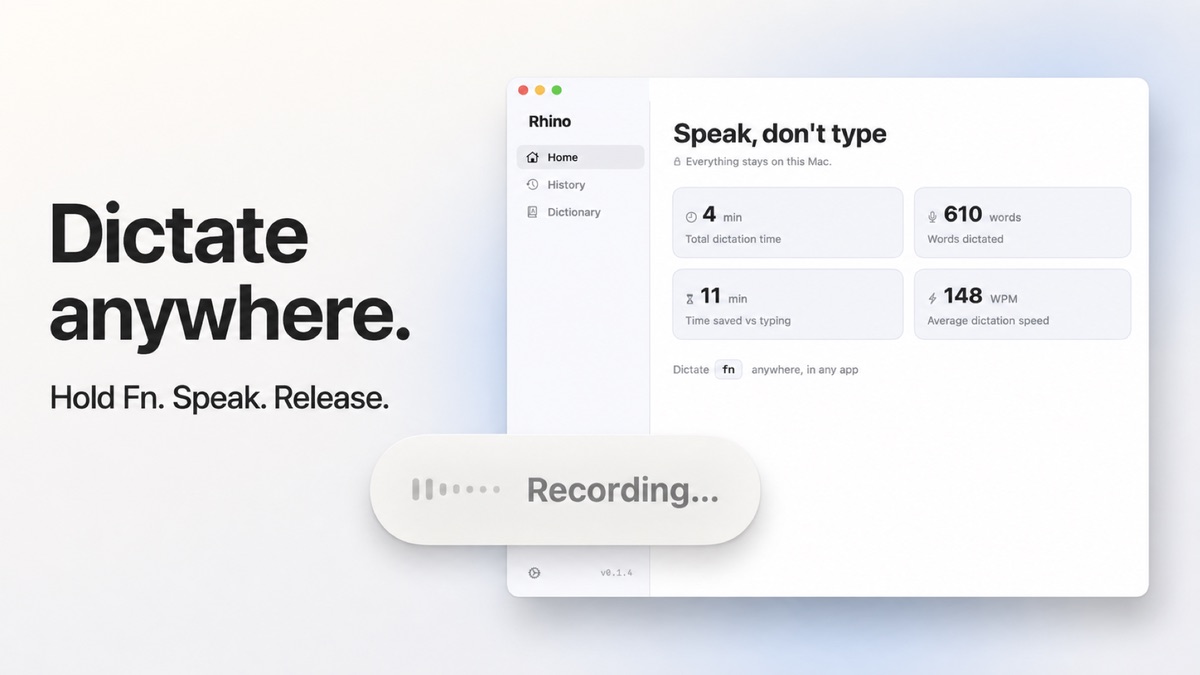
Rhino Voice is a Mac-only AI dictation app. You hold the Fn key, talk, and release. Cleaned-up text appears wherever your cursor is.
The big difference from its competitors is privacy. Everything runs on your Mac. Transcription, AI cleanup, history, all of it. There’s no account, no login, and no telemetry. Turn off your Wi-Fi and it still works.
It’s also brand new. Version 0.1.0 shipped on August 11, 2026. The maker says so plainly on the deal page.
If you’re on a Mac, care about privacy, and want to stop paying a subscription for dictation, $5 is close to a no-brainer. If you need Windows, iPhone, or a polished product with years of edge cases handled, look elsewhere for now.
What is Rhino Voice?
Rhino Voice is AI dictation for Mac. It turns your speech into polished text in any app that accepts typing.
That includes Slack, Gmail, Notion, Google Docs, Xcode, and the terminal. You don’t switch to a separate window and you don’t copy and paste. Rhino types straight into the field your cursor is already in.
What makes it “AI dictation” rather than plain speech-to-text is the cleanup pass. Apple’s built-in dictation transcribes you literally, ums and all. Rhino removes filler words, fixes dropped words, and adds punctuation and capitals. You can ramble, change your mind mid-sentence, and still get a clean paragraph.
This is a revolution in productivity speed – for me. (And probably for you, too.)
Who made Rhino?
This part is interesting.
Rhino was built by Noah Kagan, the founder of AppSumo. His book, Million Dollar Weekend, I highly recommended for solo entrepreneurs. It sits in the same “Sumo family” as TidyCal, BreezeDoc, FormRobin, and SendFox, which I’ve written about before.
His reason for building it is simple. In his words on the deal page, he wanted AI dictation that was accurate, had no subscription, and was private. Nothing on the market did all three, so he built it.
That matters for one reason. A lot of lifetime deals on AppSumo come from tiny teams that disappear a year later. This one comes from the person who runs AppSumo. That doesn’t guarantee anything, but it’s a lower risk than most $5 deals.
How Rhino works
There are only three steps.
Hold Fn anywhere on your Mac. Talk normally. Release Fn and the text lands at your cursor.
If you want to dictate for longer without holding the key, double-press the shortcut. That locks hands-free recording on. Press it again when you’re done.
That’s it. There’s no app window to open first. Rhino doesn’t even need to be the front-most app.
Rhino Voice features
Everything runs on your Mac
Rhino uses two well-known speech models, Whisper and Parakeet, and runs them locally. The AI cleanup also runs on device using an embedded model.
So your audio is never uploaded. Your text is never sent to a server. There’s no cloud model you can accidentally switch on.
For most dictation apps, that’s not the case. As far as I can tell, Wispr Flow, Typeless, and VoiceDash all process your voice in the cloud. That’s how they’re so fast and accurate. But it also means every client email, private note, and half-formed idea you dictate goes through someone else’s servers.
If you dictate client data, legal notes, or anything you’d hesitate to paste into a browser, that difference is the whole reason to buy Rhino.
It ONLY works with Mac Silicone chips – not Intel chips.
Works offline
Because nothing goes to a server, Rhino works with Wi-Fi off. On a plane, in a cafe with bad internet, or anywhere you’ve decided you don’t want to be online.
Noah says turning off Wi-Fi is the test he uses to check it’s telling the truth about privacy. That’s a good test, and you can run it yourself.
Personal dictionary
Every dictation app gets names wrong. Client names, product names, acronyms, your own business jargon.
Rhino lets you add those to a personal dictionary. According to the Rhino website, the dictionary both replaces text and boosts recognition, so words stop coming back wrong. On the AppSumo deal, dictionary entries are unlimited.
I’d call this essential. In my VoiceDash testing, the personal dictionary was one of the features that made the biggest day-to-day difference.
Verbatim mode for AI prompts
This is a smart touch.
If you dictate into Claude, ChatGPT, or a terminal, Rhino skips the cleanup pass automatically. So an instruction meant for an AI assistant arrives exactly as you said it, instead of being “tidied” into something you didn’t mean.
If you write a lot of prompts by voice, like I do, that’s a real problem with other tools. It’s good to see it handled.
No surprise wall of text
If you record for five minutes or more, Rhino copies the text to your clipboard with a note instead of pasting it into whatever window happens to be focused.
That sounds minor until you’ve accidentally dumped five minutes of dictation into a Slack channel.
Local history
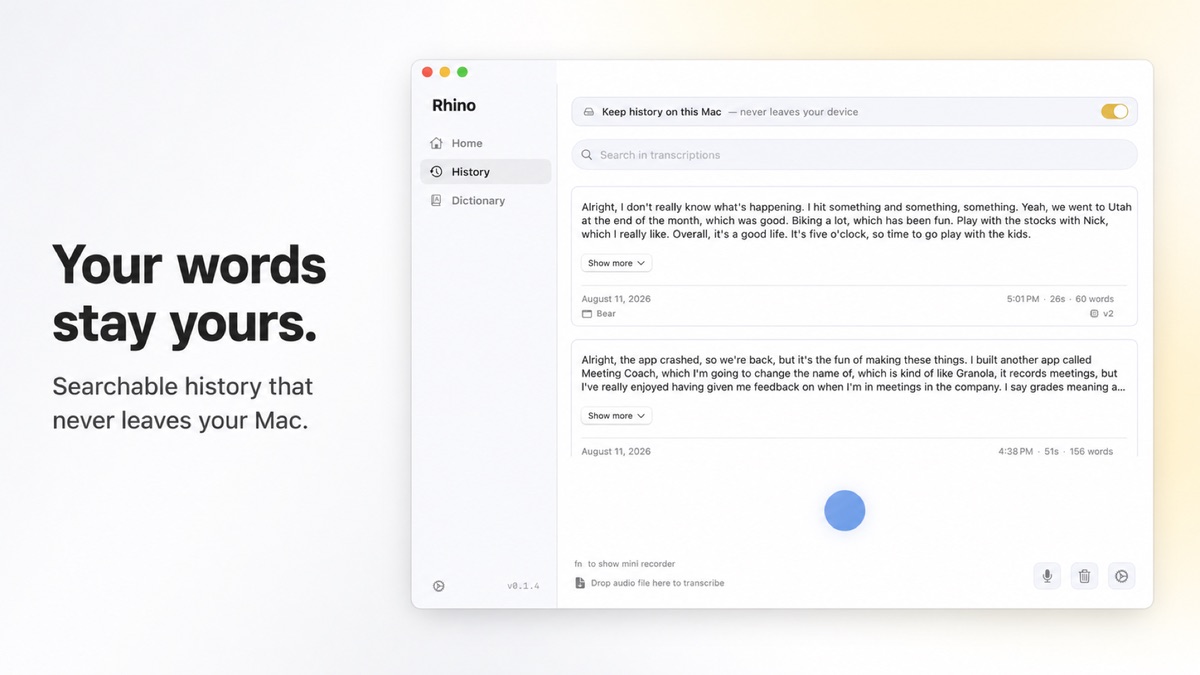
Past dictations are saved and searchable on your Mac. You can re-run an old recording through a different local model if the first pass wasn’t great.
Or you can switch history off and keep nothing at all. Your choice.
Writing stats
Rhino tracks how much you dictate versus type, your average speaking speed, and how much time you’ve saved. It’s a small thing, but it’s a nice nudge to keep using voice instead of slipping back to the keyboard.
Rhino Voice pricing
There are two ways to get Rhino, and the difference matters.
On AppSumo: $5 once for 1 code. Each code covers 1 Mac. You get unlimited dictation minutes, unlimited dictionary entries, and all future updates. You have to redeem the code within 60 days, and there’s a 60-day refund window. The deal isn’t stackable, so you can’t buy several codes to unlock more.
Direct from Rhino: The app is free to download. You get unlimited dictation for your first week, then 2,000 words a week, free forever. If you want unlimited, it’s $20 once, and that covers unlimited Macs.
So here’s how I’d think about it. If you have one Mac, the AppSumo deal is the cheapest unlimited option at $5. If you have two or more Macs, the $20 direct license covers all of them and works out better.
Either way, you’re paying once. No subscription.
Rhino vs Wispr Flow vs Typeless vs VoiceDash
Here’s how Rhino compares with the three dictation apps I’ve already tested.
| Rhino Voice | Wispr Flow | Typeless | VoiceDash | |
|---|---|---|---|---|
| Price | $5 once (AppSumo, 1 Mac) or $20 once (unlimited Macs) | $12/mo ($144/yr) | $12/mo Pro | Subscription (AppSumo deal closed) |
| Free tier | Unlimited week 1, then 2,000 words/wk | 2,000 words/wk | 4,000 words/wk | Yes |
| Platforms | Mac only | Mac, Windows, iOS, Android | Mac, Windows, iOS, Android | Mac, Windows, Android |
| Where audio is processed | On your Mac | Cloud | Cloud | Cloud |
| Works offline | Yes | No | No | No |
| Account needed | No | Yes | Yes | Yes |
| Standout | Privacy, verbatim mode for AI prompts | Command Mode, cross-device sync | Context-aware tone, speak-to-edit | Snippets, personal dictionary |
| Maturity | Launched Aug 2026 | Heavily funded market leader | Launched Nov 2025 | Launched Feb 2025 |
Rhino vs Wispr Flow: Wispr Flow is the most polished and has the most money behind it. It works across Mac, Windows, iPhone, and Android, and syncs your dictionary between devices. But it runs in the cloud, costs $144 a year, and in independent tests stops recording after about six minutes. Rhino can’t match the polish or the platform coverage. It wins on privacy and price by a mile.
Rhino vs Typeless: Typeless is my favorite of the cloud apps. Its context-aware tone and speak-to-edit features are genuinely useful for drafting. Rhino doesn’t have speak-to-edit. If you want an AI writing assistant, Typeless is better. If you just want accurate, private dictation, Rhino does that for far less. Read my Typeless vs Wispr Flow review for more.
Rhino vs VoiceDash: VoiceDash was the budget pick in my last comparison, mainly because of its AppSumo lifetime deal. That deal has closed. VoiceDash also has snippets for inserting saved text, which Rhino doesn’t. But Rhino is now cheaper and fully private. Read my VoiceDash review for the full picture.
Rhino vs Apple Dictation: Apple’s built-in dictation is free and also runs locally. But it transcribes you literally. No filler word removal, no cleanup of false starts. Rhino is basically Apple Dictation plus the AI cleanup that makes the paid apps worth using.
What reviewers say
At the time of writing, Rhino has 27 reviews on AppSumo with a 4.7 out of 5 rating. That breaks down as 23 five-taco reviews, 3 four-taco reviews, and 1 two-taco review.
The common praise is privacy, the fact that it runs entirely on device, and how simple it is to use. Hold a key, talk, release.
The common caution is the one Noah makes himself. Rhino is new. It doesn’t handle every edge case yet, and it isn’t trying to be as mature as tools that have been around for years.
The downsides
I’d rather you know these before you buy.
Mac only. There’s no Windows app and no iPhone app. If you dictate on your phone, Rhino won’t help you there.
It’s very new. Version 0.1.0 shipped in August 2026. Expect rough edges. The upside is that updates land most weeks and there’s a public changelog.
Local models have limits. Running everything on your Mac is great for privacy. But the biggest cloud models are still a step ahead on tricky accents, heavy jargon, and very messy speech. The personal dictionary closes some of that gap.
Fewer features than the cloud apps. No speak-to-edit, no snippets, no cross-device sync, and it’s not a meeting notetaker. Noah is clear that it’s designed to do one thing well.
macOS 14 or later. If you’re on an older Mac that can’t update, it won’t run.
Who should buy Rhino Voice?
Rhino is a good fit if you:
- Use a Mac running macOS 14 or later
- Dictate client work, private notes, or anything you’d rather not send to a server
- Write a lot of AI prompts by voice
- Are tired of paying monthly for dictation
- Want to try AI dictation without committing to a subscription
Skip it if you:
- Need Windows or iPhone support
- Want advanced editing features like speak-to-edit
- Need a mature, battle-tested tool for a team today
My take
Dictation is one of the highest leverage tools I use. Most people speak around three times faster than they type, and once you get used to it, going back to the keyboard for long emails feels slow.
The problem has always been cost and privacy. The good apps are subscriptions, and they all send your voice to the cloud.
Rhino fixes both. For $5, you get unlimited private dictation on your Mac, with AI cleanup, a personal dictionary, and future updates included. The trade-off is that it’s new, it’s Mac only, and it’s lighter on features than Wispr Flow or Typeless.
At $5 with a 60-day refund window, the downside is basically zero. If it doesn’t work for you, get your money back.
If you’re on a Mac, I’d grab the deal while it’s at $5. The deal page has a price-increase countdown, so it won’t stay this cheap. Then install it, add your ten most-used names and terms to the dictionary, and use it for every email for a week.
Get Rhino Voice on AppSumo for $5
Rhino Voice FAQ
Is Rhino Voice free?
Rhino has a free version. You get unlimited dictation for your first week, then 2,000 words a week for free. Unlimited use costs $5 once on AppSumo for one Mac, or $20 once direct for unlimited Macs.
Does Rhino work offline?
Yes. Transcription and AI cleanup both run on your Mac, so it works with Wi-Fi turned off.
Is Rhino Voice private?
Yes. No audio or text leaves your Mac. There’s no account, no login, and no telemetry. Your dictation history is stored locally, and you can delete it or switch it off.
Does Rhino work on Windows or iPhone?
No. Rhino Voice is Mac only and requires macOS 14 or later.
What AI models does Rhino use?
Rhino uses Whisper and Parakeet for transcription, both running locally on your Mac. A separate embedded model handles the AI cleanup, also on device.
Is Rhino better than Wispr Flow?
It depends on what you value. Wispr Flow is more polished and works on more platforms. Rhino is private, works offline, and costs $5 once instead of $144 a year. For Mac users who mostly dictate emails, messages, and prompts, Rhino covers the core job for a fraction of the price.
Does the AppSumo deal include future updates?
Yes. All future updates are included at no extra cost.

Hey, I’m Andrew. I moved to Portugal from Nova Scotia, Canada. Follow my journey here.
I’ve been building and monetizing content sites since 2003. I have built and ranked dozens of sites over many years, and I built my own WordPress SEO plugin, called SEOMedic. Now I build niche directory sites and teach others to do the same.
I’m certified in Claude and Claude Code, and a certified Systeme.io funnel builder. I run Reddit and YouTube ads for clients.
Read more of my articles on Medium.
Book a free Zoom call if you want a fresh set of eyes on your business.
